


Introduction
Sending SMS via API is one of the most widely used ways to communicate with customers. In this guide, you will discover how to integrate an API to send SMS in the best possible way. It is important to take certain factors into account to ensure that your business processes always work at 100%.
Which programming language should I use to send SMS?
Sending SMS is independent of the programming language used. This means you should use the programming language currently used in the project in which you want to integrate this service. At Afilnet, we offer code ready to copy and paste for any programming language. This code lets you send SMS quickly and easily, but if you really want to improve your solution, follow as many of the guidelines in this guide as possible.
However, you should never integrate SMS sending in a language that runs on the client side (for example, in the browser), as your credentials will be exposed to the user. The languages you should avoid are: Javascript or VBScript
What should I consider when sending SMS via API?
Sender
The sender is the origin of the SMS. In many destinations, the sender can be customized, allowing you to enter your company name here. Bear in mind that the sender has a maximum length of 11 characters. This means that any longer sender will be truncated or replaced.
Please note that sender customization is not supported by all carriers, and legislation varies across countries around the world. It is therefore important to review this information on our SMS information page. To do so, go to the pricing page, and click on "coverage information".
SMS encoding
GSM 03.38 encoding
Bear in mind that SMS is a standard based on GSM 03.38 encoding, which has certain character restrictions that may affect whether recipients receive the SMS content correctly.
The characters supported by GSM 03.38 encoding are as follows:
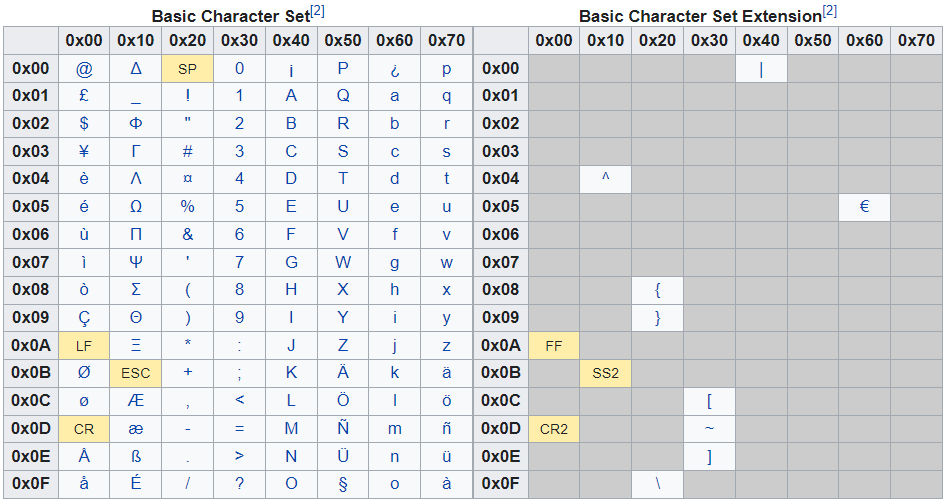
You should also consider the length of the SMS. An SMS using GSM 03.38 encoding has a maximum length of 160 characters. If you send longer SMS messages, they will be sent as concatenated messages and received by the recipient as a single SMS.
Unicode encoding
Unicode encoding allows you to send any type of character via SMS, giving you not only the ability to send accents in your SMS messages, but also support for non-Latin languages (Arabic, Chinese, Greek, Russian, etc.). If you want to send Unicode, you should know that the length of a Unicode SMS is 70 characters.
Successfully integrating an SMS API into your software
When integrating SMS sending into your application, follow our guidelines, which will not only allow you to integrate SMS sending via API, but also help you get the most out of this channel. Our goal is not just for your company to integrate the API correctly and be able to send SMS. This article will help you avoid connectivity, compatibility and security issues, as well as generate valuable information that allows you to create metrics for decision-making.
Identifying the message sent
At Afilnet, when you send an SMS, you will receive a message identifier. This identifier must be saved along with the details of the SMS sent, as it will allow you to check the delivery status of that SMS at any time.
Obtaining and using the delivery status
Once you have sent the message, it is important to know its delivery status, as in some cases there may be network-level issues, or the recipient may simply no longer exist or be unavailable. To this end, at Afilnet we offer an API where you can check the status at any time. The delivery status is essential because it tells us whether the SMS has been delivered or, conversely, whether delivery was not possible. If the SMS has not been delivered, you should have a trigger that provides notification that the SMS has not been delivered or initiates sending the notification through another channel (voice call, email, instant messaging, etc.).
Creating a log file for the API
It is important to have a log where you can consult information about messages sent, delivery status, etc. This file is important because it will help you draw conclusions about the destinations of your SMS messages. For example, you may be repeatedly sending SMS to recipients who no longer exist. It is therefore advisable, in addition to creating a log, to have a tool that monitors this log for patterns that provide you with additional information.
Securing the connection to the API

Security when connecting to the API is essential, so if you are carrying out an integration, you should take these security measures into account. Correctly implementing security for your integrations allows you to prevent problems before they arise.
Request logs
Never save API credentials in any kind of log. Credentials are confidential data that could allow third parties to impersonate you. Although log files are normally stored in directories that are not accessible, they may be exposed in the event of unauthorized access.
Enable IP filters (Whitelist)
It is important that only IPs that are actually authorized to do so can connect to the SMS API.
The Afilnet API allows you to define the IPs that will have access to the API and therefore be able to send SMS. This filter will prevent someone who gains access to your credentials from sending SMS (Please note that you must take measures to ensure this never happens, and resolve it as soon as it does).
Never share credentials
Never share your credentials with the development team, your customers, or anyone on the team who is not authorized.
The Afilnet platform allows you to manage credentials and share them only with the people who need them, when they need them. Once this access is no longer necessary, you can revoke it from the Afilnet platform itself. This feature gives you more advanced control over the people or roles that have access to the SMS sending service.
Creating roles / departments / franchisees
When integrating an API into a platform accessed by different entities of any kind, it is important to have a way to distinguish who is sending SMS. This can allow you to keep detailed track of how each person, department, franchise, etc. uses the SMS service.
At Afilnet, you can create an organizational structure with different roles and access permissions. This not only allows you to keep each identity separate when sending SMS, but also gives you the ability to track each identity independently and control access, expenses and billing.
I would like help integrating the SMS API
Our company specializes in integrating SMS sending via API. In this guide, we therefore provide detailed information on what you should consider when integrating SMS sending and the best possible way to carry out the integration. This will ensure that your communications are always successful.
References
[Wikipedia] https://en.wikipedia.org/wiki/GSM_03.38